01
Read existing FAQs
WebXtend indexes FAQ content from the existing website. This demo uses the visible FAQ section on this page as its source.
 WebXtend
Live demo
Enter a question about WebXtend below. The production FAQ Contact Deflection integration evaluates the subject and message in the browser and can show a matching answer before a contact request is sent.
Try FAQ assistance
Subject and message are ordinary form fields. WebXtend adds the FAQ assistance without replacing the surrounding contact process.
WebXtend FAQ
These product FAQs are also the content source used by the live integration above. WebXtend indexes this section and can surface the same prepared answers contextually in the contact form.
WebXtend is a business-logic layer for existing web processes. Instead of rebuilding a website, form, CMS or core system, WebXtend adds focused rules, validation and context-aware decisions to the process that is already in place.
No. WebXtend is designed to extend existing websites, forms and portals. The current interface and customer process remain in place; WebXtend supplies only the additional business logic that is needed.
The Solution observes the subject and draft message of the existing contact form, maps the request to FAQ topics through explicit deterministic rules and can render prepared FAQ answers directly inside the existing form.
With FAQ Contact Deflection, classification of the not-yet-submitted subject and message can run locally in the browser Runtime. Suggestions use FAQ content that has already been indexed and prepared, so the raw draft does not need to be sent to the WebXtend server for matching.
No. The current FAQ Contact Deflection Solution uses deterministic rules with explicit keywords, context terms, exclusions, priorities and optional typo tolerance. Generative AI or an LLM is not required to select FAQ suggestions.
Configuration and deployments are versioned. Published integration states remain traceable, Runtime versions are assigned through a controlled release path and previous states can remain available as a defined rollback path.
WebXtend offers Core at €99 per month, Pro at €299 per month and Enterprise at a custom price. Core includes selected standard Solutions and up to 2 production integrations; Pro includes all standard Solutions, up to 10 production integrations, Authoritative Result Attestation and priority support. Enterprise adds advanced operating, SLA, security and deployment requirements.
Selected organisations can apply for the closed beta and use WebXtend Pro free of charge for three months in a real web process. Admission depends on use-case fit, and there is no automatic paid renewal afterwards.
How it is integrated
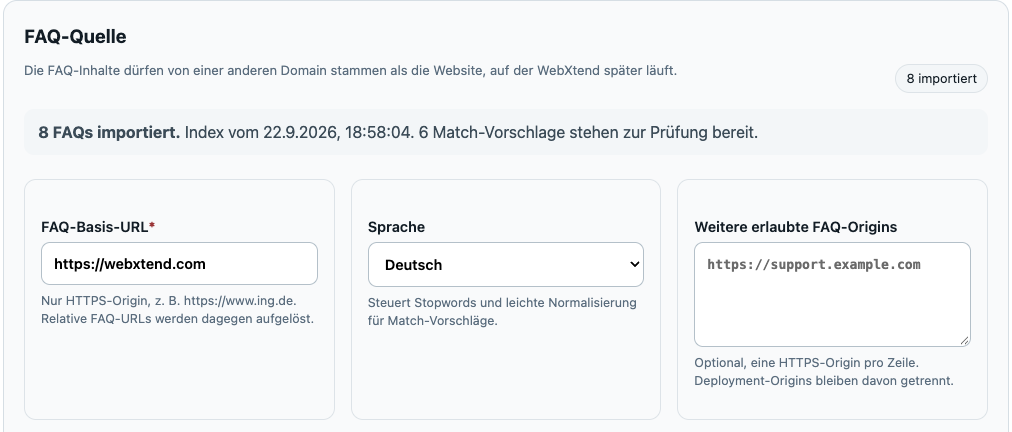
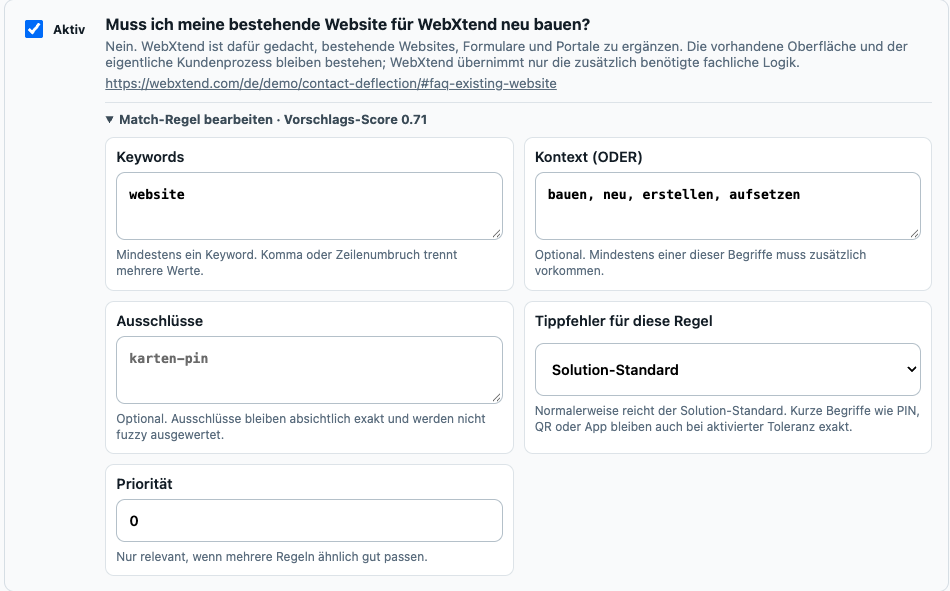
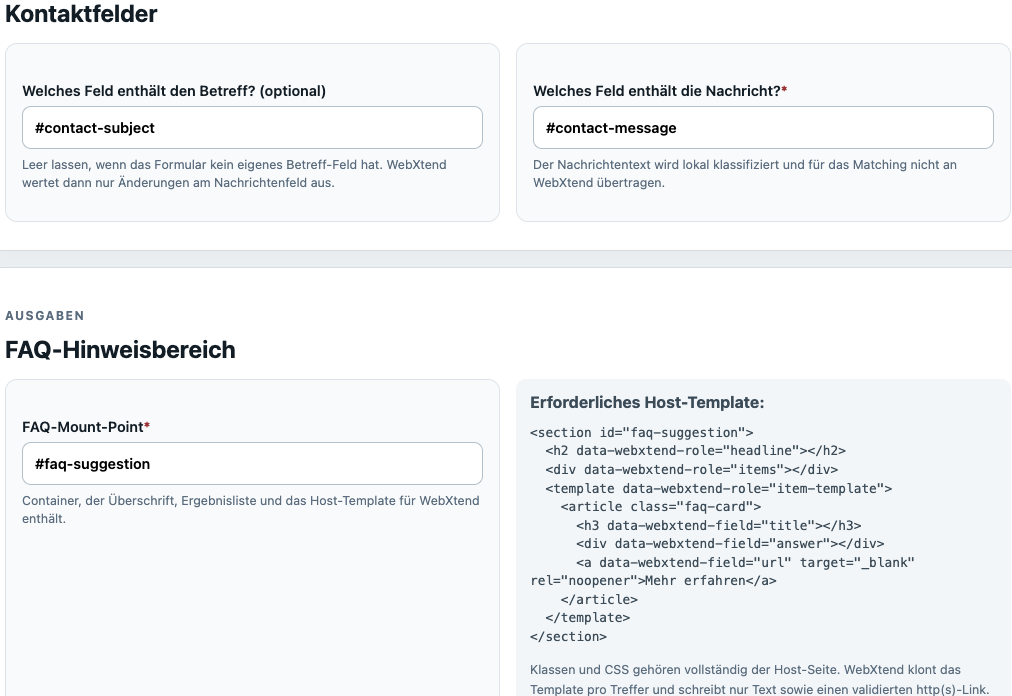
Three excerpts from the running integration show where the FAQ content comes from, how matching is controlled and how the existing form is connected. The Runtime itself is then included once.
WebXtend indexes FAQ content from the existing website. This demo uses the visible FAQ section on this page as its source.
Keywords, context terms, exclusions, typo tolerance and priority make each FAQ match explicit and reviewable.
Subject, message and the FAQ output area are connected with ordinary CSS selectors. The original form stays in place.
This demo uses the real production integration with the pinned WebXtend Runtime 2026.9.1. The configured Solution therefore runs in the same browser page you are testing.
<script
  src="https://app.webxtend.com/runtime/releases/webxtend-2026.9.1.js"
  integrity="sha384-cgKG6M1CxaxHjsIlsU14FS/+SsNQZ3VY4qgUSNNm07ryGXR2NVKpMW2V3vtODzSk"
  crossorigin="anonymous"
  defer>
</script>
<script src="/assets/contact-deflection-webxtend.js" defer></script>
Live integration. Because this site blocks inline JavaScript, the start call is kept in a small same-origin bootstrap file. The deployment ID is public and is not a credential.
Sites with a restrictive Content Security Policy allow app.webxtend.com for script-src and, when required, connect-src.
Explore the solutions or tell us about the web process you want to improve with WebXtend.